RSSrch uses Relevance Scoring to rank feed items according to how strongly they match your research model.
Scoring is separate from Admission.
Include and Exclude Rules determine whether an item is admitted. Relevance Scoring determines how strongly an item matches the research priorities represented by the scoring model.
Conceptually:
Admission
↓
Admitted item
↓
Relevance Scoring
↓
Higher- and lower-priority research
A high score cannot override a failed Include gate or an Exclude veto.
Likewise, a negative score does not automatically reject an item.
In normal research use, scoring ranks the admitted items that remain after Admission. RSSrch may also calculate scores for filtered items in diagnostic tools such as Preview so that the behavior of the research model can be inspected.
How the final Relevance Score is calculated
RSSrch combines three additive scoring layers:
Final Relevance Score
=
Article-Type Score
+
Global Scoring Concepts
+
Feed Scoring Concepts
Each matching contribution is added to the item’s total.
For example:
Article type: Review              -2
Global: Core disease mechanism    +8
Global: Oxidative stress          +4
Feed: Target experimental model   +4
Feed: Peripheral topic penalty    -1
                                   ──
Final Relevance Score             +13
The score is a weighted ranking value.
It is not a percentage, probability, or fixed 0–100 scale. Its meaning depends on the concepts and weights in your research model.
The most useful comparison is generally between items evaluated under the same model.
Open the Score workspace
In Zotero, open:
Tools → RSSrch → Rule Manager…
Then select:
Score
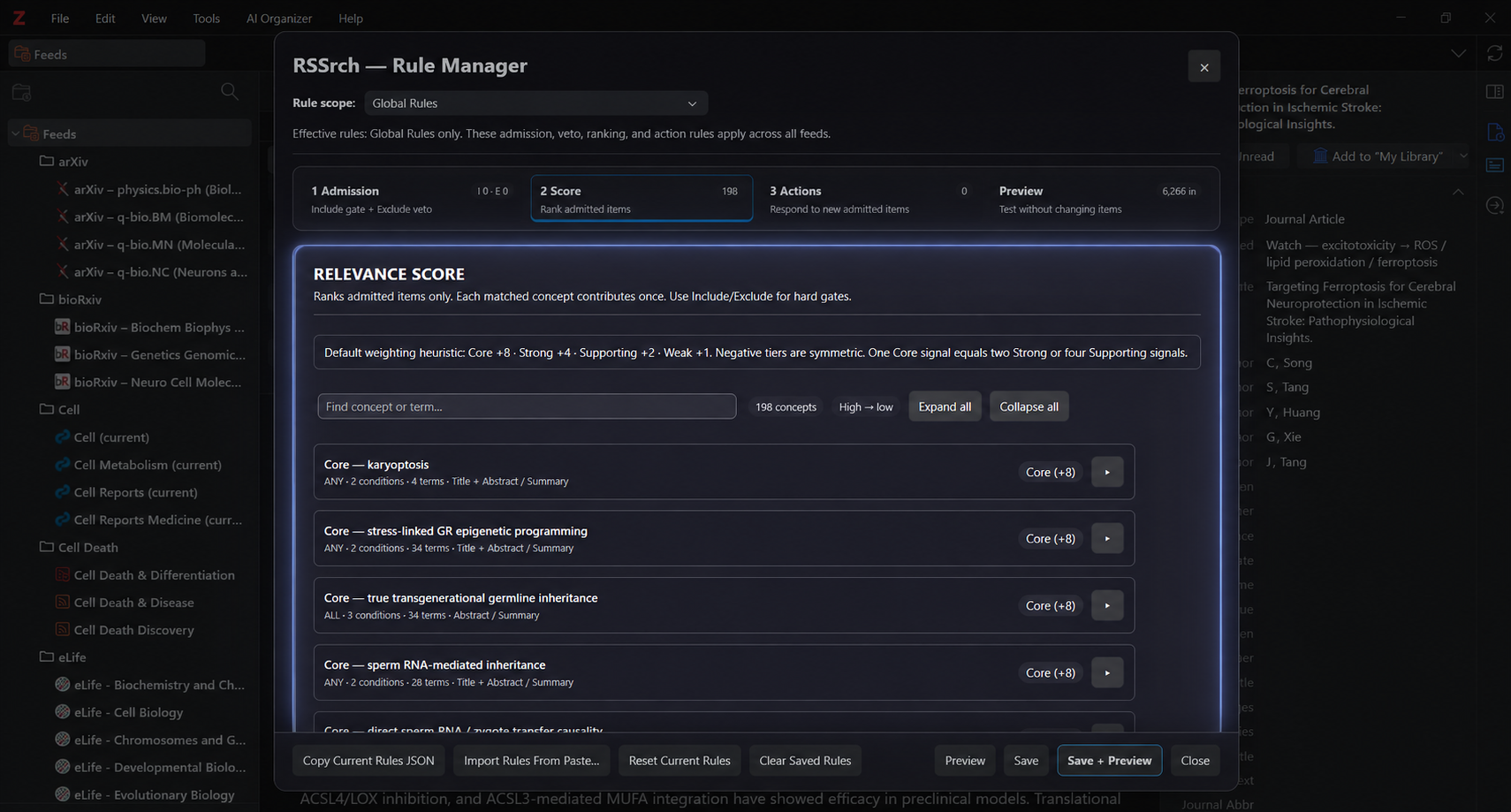
The Score workspace contains the scoring concepts for the currently selected rule scope.
A scope can be:
- Global Rules
- an individual Zotero feed
Global and feed-specific scoring contributions are combined when an item is evaluated.
Scoring concepts
The primary building block of Relevance Scoring is a scoring concept.
Each concept contains:
- a concept label
- a weight
- one or more conditions
- condition logic of ALL or ANY
Conceptually:
SCORING CONCEPT

Label
Weight

IF
ALL conditions match
or
ANY condition matches

THEN
award the concept's weight once
A concept should normally represent a meaningful research signal rather than an isolated occurrence of a word.
Examples might include:
- a central disease mechanism
- a target biological pathway
- an experimental model
- a research population
- evidence of a mechanistic relationship
- a useful methodological signal
- a context that should reduce priority
A concept contributes once
A matched scoring concept contributes its weight once.
The number of matching terms inside that concept does not multiply its score.
For example:
Concept:
Oxidative stress

Weight:
+4

Abstract contains ANY:
oxidative stress
reactive oxygen species
redox stress
ROS
If a paper contains one of those terms, the concept can contribute:
+4If the same paper contains all four terms, the concept still contributes:
+4It does not contribute +16.
This allows multiple related terms to represent one research concept without rewarding papers simply for repeating synonymous terminology.
Multiple conditions inside a concept
A scoring concept can contain more than one condition.
This allows the concept to represent relationships or contexts that cannot be expressed reliably with a single term list.
For example:
Concept:
Stress-linked glutamatergic dysregulation

Weight:
+8

IF ALL conditions match

Condition 1:
Abstract contains ANY
chronic stress
cortisol
glucocorticoid

Condition 2:
Abstract contains ANY
glutamate
NMDA
AMPA
excitotoxicity
With:
ALL conditions match
both conditions must match before the concept contributes +8.
This allows a scoring concept to represent the combination:
stress context
+
glutamatergic mechanism
rather than awarding points for either signal in isolation.
ALL conditions match
Every active condition within the concept must match.
Condition A
AND
Condition B
AND
Condition C
Use this when the scoring concept depends on several pieces of context occurring together.
ANY condition matches
At least one active condition within the concept must match.
Condition A
OR
Condition B
OR
Condition C
Use this when several conditions represent alternative ways of identifying the same research concept.
Scoring concepts support ALL and ANY condition logic.
Unlike Admission groups, scoring concepts do not use a NONE of conditions mode.
Conditions inside scoring concepts
Each context condition uses the same rule-matching system used by Admission.
Conditions can evaluate fields such as:
- Title
- Abstract / Summary
- Author
- URL
- Publication / Source
- Publisher
- Section / Article Type
- Feed Subjects
- Tags
- Manual Tags
- DOI
They also use the same matching operators, term lists, case-sensitivity behavior, and acronym-safe whole-word matching described in Include and Exclude Rules.
This creates two logical levels inside many scoring concepts:
SCORING CONCEPT
│
├── Weight
│
└── Concept logic: ALL / ANY
    │
    ├── Condition A
    │   └── Term logic: ANY / ALL
    │
    └── Condition B
        └── Term logic: ANY / ALL
For example, a concept may require ALL conditions while allowing ANY term within each individual condition.
Weighting concepts
The Rule Manager provides eight standard scoring tiers.
| Weight | Tier | Typical role |
|---|---|---|
| +8 | Core | Central research signal |
| +4 | Strong | Strong relevance signal |
| +2 | Supporting | Supporting relevance |
| +1 | Weak | Minor positive signal |
| -1 | Mild penalty | Small reduction in priority |
| -2 | Strong penalty | Clear negative signal |
| -4 | Major penalty | Substantial reduction in priority |
| -8 | Near-veto penalty | Very strong ranking penalty |
The default weighting heuristic is intentionally proportional:
Core +8
=
two Strong +4 signals
=
four Supporting +2 signals
This makes weights easier to reason about across a large research model.
Core +8
Use Core for signals that strongly define the research target.
A Core concept should normally represent something important enough that its presence materially changes how highly the paper should be prioritized.
Strong +4
Use Strong for major relevance signals that are important but not individually central enough to receive Core weight.
Supporting +2
Use Supporting for evidence that strengthens relevance when combined with other signals.
Weak +1
Use Weak for minor positive indicators.
Weak concepts can be useful for subtle context, but large numbers of broad +1 rules can produce noisy scores if they are not conceptually controlled.
Negative scoring concepts
Negative concepts lower an item’s ranking without rejecting it.
For example:
Peripheral research context
-1
or:
Low-value evidence type
-4
A negative score should be used when the paper may still be useful but should rank below stronger research matches.
This is fundamentally different from an Exclude rule.
Clearly outside the research scope
→ Exclude

Still potentially useful, but lower priority
→ Negative score
Near-veto does not mean veto
The strongest standard penalty is:
Near-veto penalty (-8)
Despite the name, it remains a scoring contribution.
It does not reject the item.
An admitted paper receiving -8 can remain visible and can still receive positive contributions from other concepts.
If a context should always reject the paper, use an Exclude rule instead.
Positive scores do not override Admission
The reverse is also important.
A paper could theoretically accumulate a very high Relevance Score while still failing Admission.
For example:
Global scoring concepts       +20
Feed scoring concepts         +12
                              ───
Score                         +32
If that paper fails an applicable Include gate or matches an Exclude veto, the score does not override the Admission decision.
The two systems answer different questions:
Admission:
Should this item enter the research scope?

Scoring:
How strongly does this item match our priorities?
Keeping those responsibilities separate makes the research model easier to understand and maintain.
Global and feed-specific scoring
RSSrch supports scoring concepts at two rule scopes:
- Global Rules
- individual feed rules
Unlike Admission gates, scoring contributions from these scopes are simply additive.
Global Score
+
Feed Score
=
Rule-Based Score
For example:
Global concept:
Mitochondrial dysfunction     +4

Feed concept:
Motor neuron context          +8

Rule-Based Score             +12
Article-Type Scoring is then added separately.
Global scoring concepts
Global concepts are useful for signals that matter broadly across the research environment.
Examples might include:
- central mechanisms
- major research outcomes
- target populations
- broadly important evidence types
Feed-specific scoring concepts
Feed-specific concepts can represent signals whose importance is specific to a particular feed.
They can be useful when:
- a feed has a narrow subject area
- terminology has a different meaning in that source
- a specific journal or publisher requires additional context
- certain signals deserve more or less weight within one research stream
Avoid accidental duplicate weighting
Global and feed scoring are additive.
RSSrch does not treat conceptually similar Global and feed concepts as the same scoring contribution during evaluation.
If both match, both contribute.
For example:
Global:
Oxidative stress              +4

Feed:
Oxidative stress              +4
                              ──
Combined contribution         +8
That may be intentional.
If it is not intentional, avoid representing the same research signal at both scopes.
The same consideration applies to automatic Article-Type Scoring and custom scoring concepts.
Concept order in the Rule Manager
The Score workspace displays scoring concepts from:
High → low
Higher-weight concepts are shown before lower-weight concepts.
Concepts with the same weight retain their saved order.
The toolbar also provides:
- Find concept or term…
- Expand all
- Collapse all
The Find field filters the scoring concepts currently visible in the editor.
It does not change or remove any rules.
This is particularly useful for larger research models containing many concepts.
Article-Type Scoring
RSSrch includes a separate Article-Type Scoring layer.
Open:
Tools → RSSrch → Rules & Scoring → Article-Type Scoring…
Article-Type Scoring can automatically add a score contribution based on the article type supplied by the publisher or inferred from the title when appropriate.
This layer is enabled by default.
It is additive with Global and feed-specific scoring concepts.
It does not include or exclude items.
Default article-type weights
RSSrch 1.0.0 uses the following defaults:
| Article type | Default score |
|---|---|
| Article / Original Article | 0 |
| Review | -2 |
| Systematic Review | -1 |
| Meta-Analysis | -1 |
| Correction | -8 |
| Erratum / Corrigendum | -8 |
| Retraction | -8 |
| Editorial | -4 |
| Commentary | -4 |
| Letter | -2 |
| Perspective | -2 |
| Protocol | -4 |
| Case Report | -2 |
These values can be changed in the Article-Type Scoring dialog.
They represent ranking preferences, not Admission rules.
For example, a Retraction receiving -8 is strongly demoted by default, but Article-Type Scoring itself does not create an Exclude veto.
How article type is determined
RSSrch gives structured publisher metadata priority.
The basic decision path is:
Section / Article Type populated?
│
├── Yes
│   ↓
│   Classify structured value
│
│   Unknown structured value
│   → neutral
│
└── No
    ↓
    Title fallback enabled?
    │
    ├── Yes
    │   → cautiously classify from title
    │
    └── No
        → unclassified / neutral
Structured Section / Article Type wins
If the item’s Section / Article Type field contains a value, RSSrch uses that structured value as the authoritative source for Article-Type Scoring.
Recognized structured values can identify:
- Article / Original Article
- Review
- Systematic Review
- Meta-Analysis
- Correction
- Erratum / Corrigendum
- Retraction
- Editorial
- Commentary
- Letter
- Perspective
- Protocol
- Case Report
More specific classifications are evaluated before more general classifications.
For example, a Systematic Review is classified as Systematic Review rather than falling through to the more general Review category.
Unknown structured values remain neutral
If Section / Article Type is populated but the value is not recognized, RSSrch leaves the article type neutral.
It does not then fall back to title classification.
This behavior is intentional because publisher-supplied structured metadata is treated as authoritative when present.
Title fallback
By default, RSSrch can classify an article from its title when:
Section / Article Type is empty
Title classification is intentionally more conservative than structured metadata classification.
This reduces the risk of interpreting an ordinary word in a research title as a publication type.
Title fallback can be disabled in the Article-Type Scoring dialog.
Avoid article-type double weighting
Article-Type Scoring and custom scoring concepts are additive.
Suppose Article-Type Scoring contains:
Review
-2
and the Global scoring model also contains:
Concept:
Review article

Weight:
-2
If both match:
Article-Type contribution     -2
Global scoring concept        -2
                              ──
Combined effect               -4
This may be desirable if the additional penalty is intentional.
If not, remove or adjust one of the overlapping contributions.
The Article-Type Scoring dialog specifically exists as an independent scoring layer, so custom review, editorial, protocol, or similar penalties should be considered in relation to it.
Worked scoring example
Consider an admitted paper that matches the following signals:
Article type:
Systematic Review             -1

Global concepts:
Core disease mechanism        +8
Oxidative stress              +4
Mitochondrial dysfunction     +4

Feed concepts:
Human experimental context    +2
Peripheral topic penalty      -1
RSSrch adds the contributions:
-1
+8
+4
+4
+2
-1
───
+16
The final Relevance Score is:
+16If the Oxidative stress concept contained five synonymous terms and the paper matched all five, that concept would still contribute only its configured +4.
The score is the sum of matched concepts, not the number of keyword occurrences.
The Score column
RSSrch adds a Score column to Zotero’s main item tree.
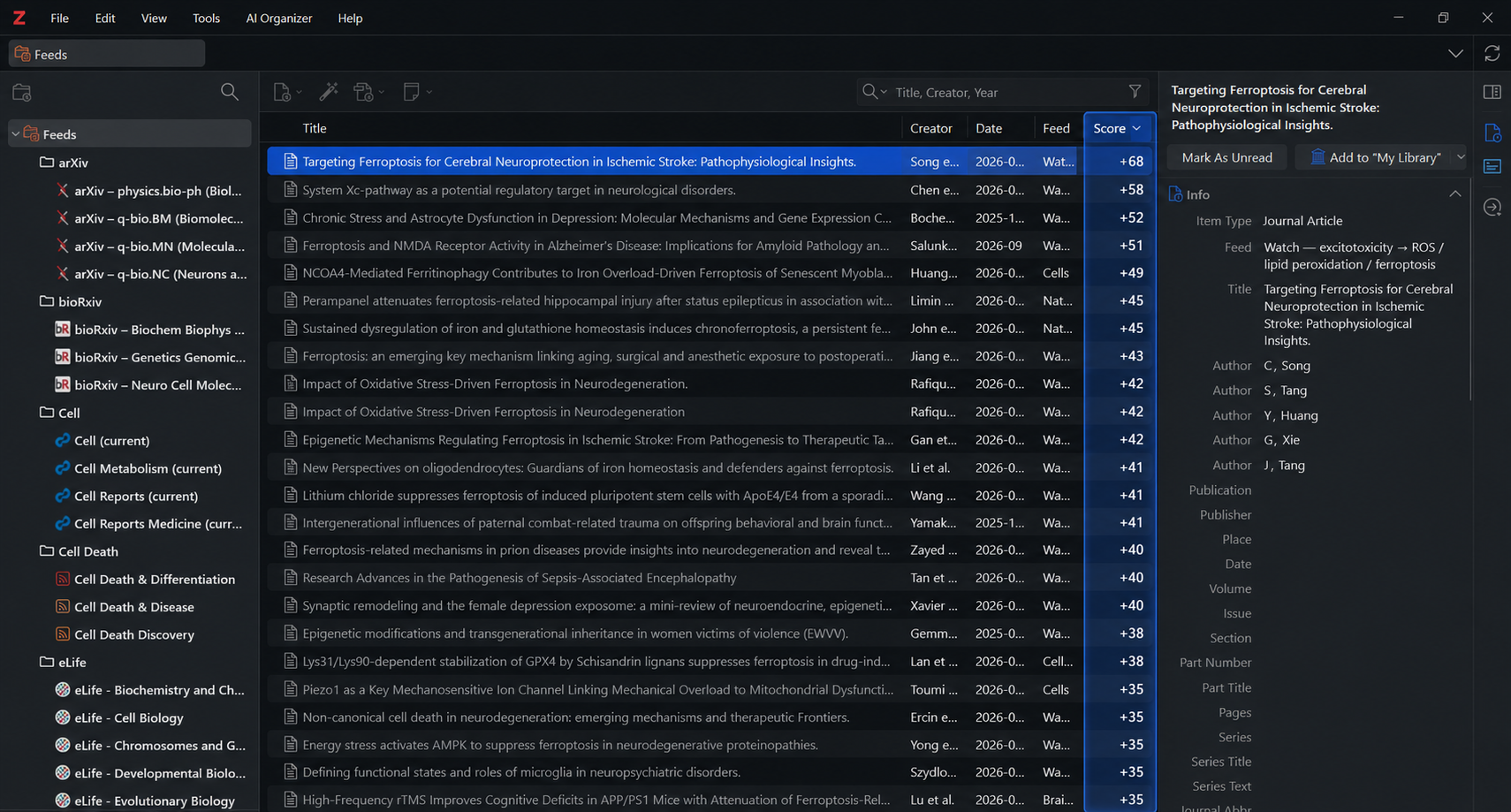
For feed items, the column displays the current RSSrch Relevance Score using signed values such as:
+16
+8
+2
0
-4
The column can be sorted numerically to rank feed items by Relevance Score.
This makes it possible to use Zotero’s native item list as a research-prioritization view.
Higher-scoring papers can be brought to the top of the list for review while lower-priority papers remain available.
The Score column applies to RSSrch feed-item scoring. Non-feed library items do not receive an RSSrch feed relevance value in this column.
Score Breakdown in the RSSrch Reader
RSSrch also exposes the reasons behind a score in the Reader panel.
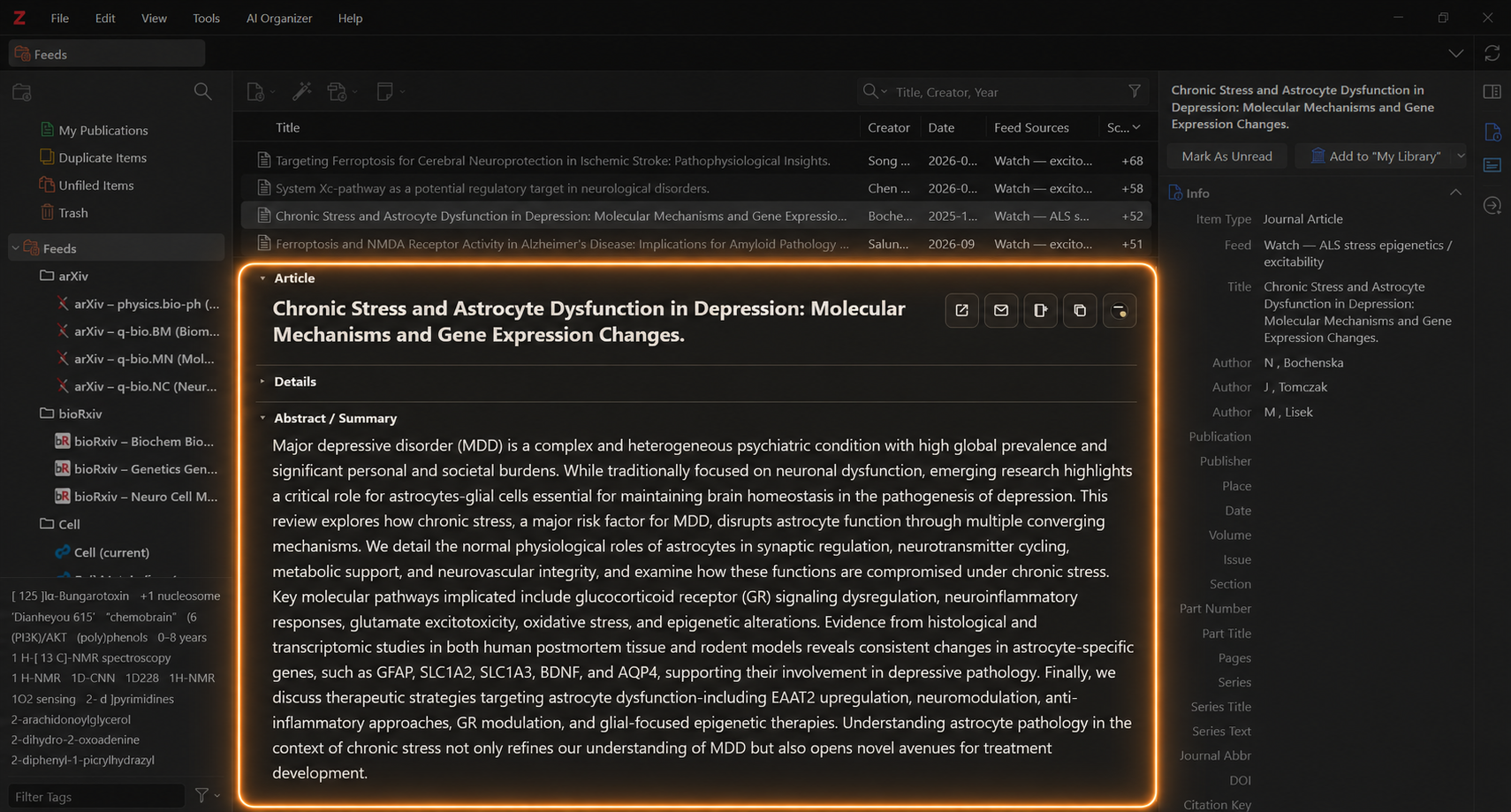
When an item has matched scoring contributions, the Reader can display a Score Breakdown.
For example:
+8 Core disease mechanism
+4 Oxidative stress
+2 Human experimental context
-1 Article type: Systematic Review
This lets the score remain interpretable.
Instead of seeing only:
+13you can inspect which research concepts contributed to that value.
The breakdown can contain contributions from:
- Article-Type Scoring
- Global scoring concepts
- feed-specific scoring concepts
Test scoring with Preview
The Rule Manager’s Preview workspace can evaluate the current rule configuration without modifying feed items.
Preview evaluates the current Rule Manager state, including unsaved edits.
After changing scoring concepts:
- Open Preview.
- Click Preview.
- Review the ranked results.
- Open Diagnostics on items that need closer inspection.
Preview reports:
- total items evaluated
- included items
- filtered items
- Relevance Scores
- highest-ranked results
Results are ranked by Score.
Both included and filtered items can display a score in Preview.
This is intentional.
A filtered item’s score can be useful diagnostically even though that score cannot override its Admission result.
Detailed scoring diagnostics
Each Preview result provides a Diagnostics control.
Detailed diagnostics evaluate the item’s rule conditions and can show the scoring contributions that produced its total.
For a simple matched concept, you may see a contribution such as:
+4 Oxidative stressFor a multi-condition concept, RSSrch can also report whether its context was satisfied.
For example:
+8 Stress-linked glutamatergic dysregulation
ALL context satisfied
2/2 conditions matched
The detailed view can then show the individual context conditions.
This is particularly useful when building relationship concepts using multiple conditions.
If the rules are changed after a Preview has been run, the previous result is marked:
Stale
Run Preview again to evaluate the current configuration.
Designing useful scoring concepts
A useful scoring model should represent the structure of the research problem rather than simply accumulate keywords.
Group synonymous terminology into concepts
Instead of creating separate +4 concepts for:
oxidative stress
reactive oxygen species
ROS
redox stress
consider representing them as terms inside one coherent concept:
Concept:
Oxidative stress

Weight:
+4

Terms:
oxidative stress
reactive oxygen species
ROS
redox stress
The concept can then contribute +4 once.
This avoids rewarding terminology repetition.
Use multiple conditions for relationships
When the scientific relevance depends on two ideas occurring together, use a multi-condition concept.
For example:
Concept:
Mechanism in target disease context

Weight:
+8

IF ALL conditions match

Condition 1:
Target disease terminology

Condition 2:
Target mechanism terminology
This is generally more precise than assigning independent high weights to two broad term lists.
Reserve Core weight for genuinely central signals
If too many concepts receive +8, the distinction between Core and Supporting evidence becomes less meaningful.
A useful hierarchy is:
Core
central to the research question

Strong
important mechanistic or contextual evidence

Supporting
reinforces the research interpretation

Weak
minor additional relevance
Use penalties for lower priority, not rejection
A negative concept is appropriate when the paper may still have research value.
Use Exclude only when the context should function as a hard veto.
Avoid uncontrolled accumulation
Because scoring is additive, many broad concepts can collectively produce a large score even when no individual signal is especially informative.
For example:
+1 broad term
+1 broad term
+1 broad term
+1 broad term
+1 broad term
...
can eventually outweigh a carefully designed stronger concept.
Prefer fewer meaningful concepts with clear research interpretations over large collections of generic keyword bonuses.
Watch for duplicate signals
Check for conceptual overlap between:
- Global concepts
- feed-specific concepts
- Article-Type Scoring
Overlapping contributions are added together.
That behavior can be used intentionally, but accidental duplication can distort ranking.
Relevance Score is a model, not an absolute measure
RSSrch does not assign universal scientific importance to a paper.
The score represents the priorities encoded in the current research model.
A score of:
+12does not mean that a paper is objectively “12 points relevant.”
It means that the paper accumulated +12 under the concepts, weights, feed rules, and Article-Type settings currently configured in RSSrch.
For this reason, changes to the research model can change scores even when the underlying paper has not changed.
Relevance Score is most useful as a relative ranking system within a defined research model.
Recommended workflow
When creating or refining a scoring model:
- Define Admission first using Include and Exclude Rules.
- Identify the research concepts that should affect priority.
- Group synonymous terminology into coherent concepts.
- Use multi-condition concepts when relevance depends on context or relationships.
- Assign weights according to the importance of each concept.
- Add negative concepts for material that remains useful but deserves lower priority.
- Review the automatic Article-Type Scoring configuration.
- Check for duplicate weighting across Article Type, Global, and feed rules.
- Run Preview.
- Inspect high- and low-ranked papers.
- Use Diagnostics to inspect unexpected scores.
- Adjust concepts or weights where necessary.
- Save the refined rules.
- Use the Zotero Score column and RSSrch Reader breakdown during normal research triage.
Next
Once RSSrch has decided whether an item is admitted and calculated its Relevance Score, rules can use those results to perform automated operations.
➡️ Continue to Actions