RSSrch uses Include and Exclude rules to determine whether a feed item is admitted by the current research model.
These rules form the Admission stage of RSSrch processing.
The basic order is:
Include gate
↓
Exclude hard veto
↓
Admitted item
An item must first satisfy the applicable Include logic.
After that, RSSrch checks the Exclude rules.
If an applicable Exclude rule matches, the item is rejected even if it passed the Include gate.
When Filter Native Feed View is enabled, which it is by default, items that fail Admission are filtered from the Zotero feed item view.
Admission also controls downstream RSSrch behavior such as Actions, regardless of whether native feed-view filtering is currently enabled.
This lets RSSrch distinguish between:
-
literature that belongs in a research scope
-
literature that uses relevant terminology but represents the wrong context
-
literature that should remain available but rank lower instead of being rejected completely
Admission rules are configured in the Rule Manager.
Open Admission rules
In Zotero, open:
Tools → RSSrch → Rule Manager…
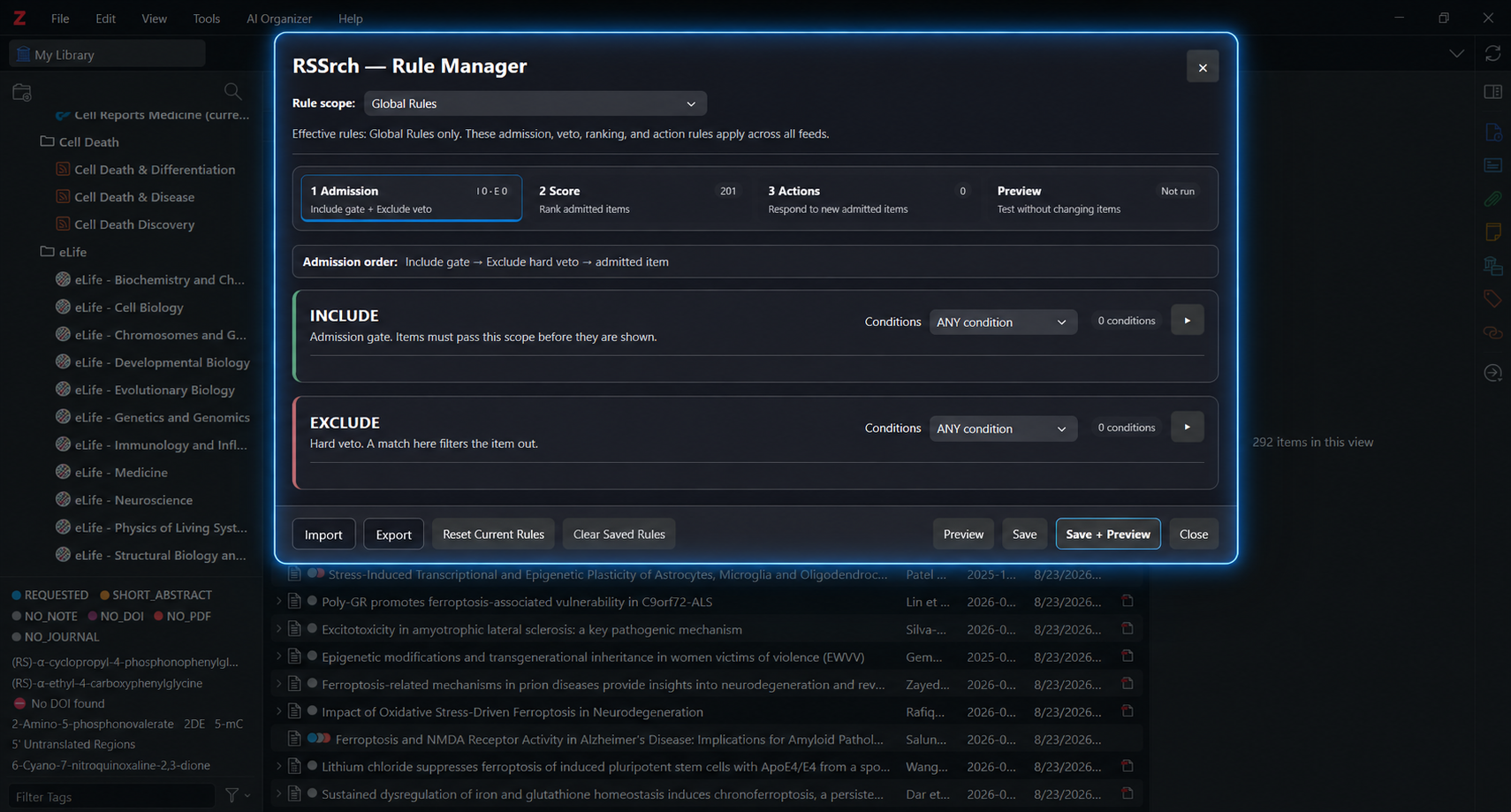
Select the Admission workspace.
The Admission workspace contains two sections:
-
Include
-
Exclude
Include rules
Include rules act as an admission gate.
They define what an item must match before it is admitted by the RSSrch research model for that rule scope.
For example, an Include rule could identify literature involving:
-
a disease or condition
-
a biological mechanism
-
a research population
-
a publication source
-
an experimental system
-
a specific article type
-
a research topic represented by tags or feed subjects
If active Include conditions are configured, an item must satisfy the configured Include logic.
If no active Include conditions exist, the Include gate passes automatically.
This means you do not need to create an Include rule merely to allow items through.
Example
A research model focused on motor neuron disease might contain an Include condition looking for terminology such as:
amyotrophic lateral sclerosis
ALS
motor neuron disease
motor neuron degeneration
With ANY condition or ANY term logic, an item matching one of those signals could pass the Include gate.
The exact rule design depends on the scope of the research model.
Exclude rules
Exclude rules act as hard vetoes.
An item that matches the configured Exclude logic is rejected even if it passed the Include stage.
Exclude rules are useful when relevant terminology appears in literature that belongs to the wrong research context.
Examples may include:
-
an unrelated disease
-
an unwanted experimental application
-
a population outside the research scope
-
an irrelevant publication type
-
a mechanism being used for a different purpose
-
a source or subject area that produces persistent noise
Example
Suppose a research model tracks ferroptosis as a disease mechanism.
A paper discussing ferroptosis might initially appear relevant.
However, if the paper studies ferroptosis primarily as a method for killing cancer cells, that application may fall outside the intended research scope.
An Exclude rule can identify that unwanted context and veto the item.
This is different from giving the paper a negative relevance score.
An Exclude rule means:
Do not admit this item.A negative scoring concept means:
The item may still be useful, but rank it lower.Include versus Exclude
A useful way to think about the two systems is:
Include asks:
Does this paper belong in the research scope?
Exclude asks:
Is there a reason this paper should be rejected even though it otherwise looks relevant?
This separation helps avoid overly complicated rules.
For example, you usually do not need to construct a large Include rule that attempts to describe every possible unwanted context.
Instead:
Include
Relevant research signals

Exclude
Known unwanted contexts
The two stages can then work together.
Global and feed-specific Admission
RSSrch supports both:
-
Global Rules
-
rules for an individual Zotero feed
Global and feed-specific Admission rules are evaluated separately and then combined.
Include behavior
If both Global Rules and feed-specific rules contain active Include conditions, the item must pass both Include gates.
Conceptually:
Global Include
AND
Feed Include
If one scope has no active Include conditions, that scope’s Include gate passes automatically.
Exclude behavior
An Exclude match from either applicable scope can veto the item.
Conceptually:
Global Exclude
OR
Feed Exclude
Feed-specific rules therefore supplement Global Rules rather than replacing them.
This allows broadly useful research criteria to remain Global while individual feeds add narrower requirements or exclusions.
For more information about rule scopes, see Rule Manager.
Condition logic
Both Include and Exclude sections allow conditions to be combined using group logic.
Available modes are:
-
ANY condition
-
ALL conditions
-
NONE of conditions
ANY condition
The group matches when at least one configured condition matches.
Example:
Condition 1: Title contains ALS
Condition 2: Abstract contains amyotrophic lateral sclerosis
Condition 3: Feed Subjects contains motor neuron disease
With ANY condition, matching any one of these conditions is sufficient for the group to match.
ALL conditions
Every configured condition must match.
This is useful when relevance depends on a relationship between concepts rather than the presence of a single term.
Example:
Condition 1: Abstract contains stress terminology
Condition 2: Abstract contains receptor regulation terminology
With ALL conditions, the item must satisfy both conditions.
NONE of conditions
The group matches only when none of the configured conditions match.
This can be useful when a rule needs to represent the absence of a set of signals.
Use this mode carefully, especially in Exclude rules, because negative logic can become difficult to interpret in larger rule models.
Add a condition
Click:
+ Add condition
Each condition examines a specific Zotero or RSSrch metadata field.
Available fields include:
-
Title
-
Abstract / Summary
-
Author
-
URL
-
Publication / Source
-
Publisher
-
Section / Article Type
-
Feed Subjects
-
Tags
-
Manual Tags
-
DOI
Choose the field that most directly represents the information you want the rule to evaluate.
For example:
Title
contains whole word
ferroptosis
or:
Publication / Source
equals
Nature Neuroscience
Condition operators
RSSrch supports several matching operators.
contains
Matches when the configured text occurs anywhere in the field.
Example:
oxidative stresscan match a longer phrase containing those words.
contains whole word
Matches the configured term as a complete word or token rather than simply as part of another string.
This can reduce accidental partial matches.
RSSrch also applies acronym-safe handling to short ALL-CAPS terms when this operator is used.
begins with
Matches when the field begins with the configured text.
ends with
Matches when the field ends with the configured text.
equals
Requires the complete field value to match.
This can be useful for structured metadata such as a publication name or DOI.
matches regexp
Evaluates the field using a regular expression.
Regular expressions can represent more complex matching patterns but should generally be used only when simpler operators cannot express the rule clearly.
is empty
Matches when the selected field has no value.
No term list is required.
is not empty
Matches when the selected field contains a value.
No term list is required.
Multiple terms
Text-based conditions can contain multiple terms or phrases.
Entering one term or phrase per line is recommended.
For example:
amyotrophic lateral sclerosis
motor neuron disease
motor neuron degeneration
ALS
The condition can then determine whether:
-
ANY term must match
-
ALL terms must match
RSSrch can also parse comma-separated and semicolon-separated term lists.
Quoted entries can be used when a term itself contains a delimiter.
For readability and maintenance, one term or phrase per line is generally the clearest format.
ANY term
At least one term in the condition must match.
This is useful for synonyms and equivalent terminology.
ALL terms
Every listed term must match the selected field.
This is useful when several concepts must occur together within the same metadata field.
Use concepts, not just isolated keywords
Admission rules work best when they represent meaningful research concepts rather than large collections of loosely related words.
For example:
ALS
motor neuron disease
amyotrophic lateral sclerosis
represents a coherent concept.
A single broad term such as:
stressmay occur in many unrelated contexts.
If a broad term is necessary, it can often be made more precise by combining conditions.
For example:
ALL conditions

Condition 1:
Abstract contains
stress

Condition 2:
Abstract contains any
glutamate
excitability
receptor regulation
This lets the rule describe a relationship rather than simply reacting to one common word.
Use the most appropriate metadata field
A condition does not always need to search the title or abstract.
RSSrch can also evaluate structured metadata such as:
-
publication
-
authors
-
article type
-
feed subjects
-
tags
-
DOI
Using the narrowest appropriate field can improve rule precision.
For example, if you want to identify a specific journal, use:
Publication / Source
instead of searching the abstract for the journal name.
If you want to distinguish article types, use:
Section / Article Type
when that metadata is available.
Feed Subjects
The Feed Subjects field represents the automatic Zotero tags associated with the feed item.
These can include:
-
subject or category metadata supplied through the feed
-
publisher or structured subject metadata retained by RSSrch
-
subject and keyword metadata added through RSSrch enrichment
RSSrch stores accepted subject metadata as Zotero automatic tags when automatic tagging is enabled.
Because available metadata varies by feed provider, publisher, and enrichment source, use Preview to verify that a Feed Subjects rule behaves as expected across the feeds in your research scope.
Tags and Manual Tags
Admission conditions can also evaluate Zotero tags.
Tags
The Tags field contains all Zotero tags associated with the item, including both automatic and non-automatic tags.
Manual Tags
The Manual Tags field contains non-automatic Zotero tags.
These include user-created manual tags and manual tags added by RSSrch Actions.
Use Manual Tags when intentionally assigned tags should be evaluated separately from automatic subject metadata.
Case sensitivity
Conditions can be configured as:
Case sensitive
By default, ordinary terms and phrases are matched without regard to case.
There is one important exception for contains whole word conditions.
Short ALL-CAPS alphabetic acronyms containing 2 to 5 letters are automatically matched using exact case even when Case sensitive is off.
This reduces collisions between research abbreviations and ordinary words.
For example:
ALS
ARE
UMN
retain their capitalization automatically in whole-word matching.
For other operators, or for terminology where capitalization itself is significant, enable Case sensitive explicitly.
Condition labels
Conditions can have optional labels.
Labels do not affect matching behavior.
They make the research model easier to inspect and maintain.
Examples:
Motor neuron terminology
Stress signaling context
Human cohort requirement
Exclude oncology ferroptosis
Review article filter
Clear labels become increasingly useful as the research model grows.
Filter Native Feed View
Admission and feed-view filtering are related but separate concepts.
When Filter Native Feed View is enabled, RSSrch uses Admission results to filter rejected items from Zotero’s native feed item view.
This setting is enabled by default.
When native feed-view filtering is disabled:
-
Include and Exclude rules are still evaluated
-
Admission decisions still exist
-
Actions still depend on Admission
-
rejected items are not hidden from the Zotero feed item list solely because they failed Admission
This can be useful when you want RSSrch to continue evaluating the research model without using Admission as a visible feed-list filter.
Hard filters should remain intentional
Exclude rules are powerful because they reject matching items from the research model.
When native feed-view filtering is enabled, those rejected items are also removed from the corresponding RSSrch-filtered feed view.
Use Exclude when the unwanted context is sufficiently clear that the paper should not be admitted.
If an item could still contain useful evidence, a negative scoring concept may be more appropriate.
For example:
Definitely outside the research scope
→ Exclude

Potentially useful but lower priority
→ Negative score
This distinction helps prevent useful literature from disappearing because of an overly broad veto.
Avoid unnecessarily restrictive Include gates
Include rules can also become too restrictive.
A research topic may be described using terminology that was not anticipated when the model was created.
If the Include gate requires a narrow vocabulary, relevant papers using different terminology may never reach the scoring stage.
For this reason, Include rules should generally describe the boundaries of the research scope without attempting to encode every indication of relevance.
More nuanced relevance can then be handled by Relevance Scoring.
Preview Admission behavior
The Preview workspace in the Rule Manager can test the current Rule Manager state without modifying feed items.
Preview can evaluate unsaved edits.
After editing Include or Exclude rules, open:
Preview
and click:
Preview
RSSrch reports the effect of the current rules, including how many items are:
-
included
-
filtered
This makes Preview useful for experimenting with:
-
broader or narrower Include gates
-
new exclusion vetoes
-
terminology changes
-
additional metadata fields
-
revised condition logic
If the rules are changed after Preview has been run, RSSrch marks the previous result as:
Stale
Run Preview again to evaluate the updated configuration.
Audit filtered items
RSSrch can export rejected items for detailed false-negative review.
In the Rule Manager, open the Export menu and choose:
Export Rejected Items for Audit…
The rejected-items audit evaluates the saved RSSrch rules for the selected feed view.
If you have unsaved Rule Manager changes that you want included in the audit, save those rules first.
The audit includes the Admission decision and detailed Global and feed-level Include and Exclude evaluations for rejected items.
This can help identify:
-
overly broad exclusions
-
overly restrictive Include rules
-
missing terminology
-
unexpected filtering behavior
Reviewing rejected items is especially useful after a major research-model change.
A rule model can then be refined when relevant papers are being rejected for the wrong reason.
For testing unsaved changes before committing them, use Preview instead.
Include and Exclude rules versus scoring
Admission and scoring serve different purposes.
Admission
Determines whether the paper is admitted by the research model.
Include
↓
Exclude
↓
Admitted
Scoring
Determines how important an admitted paper is.
Admitted item
↓
Scoring concepts
↓
Relevance score
A scoring concept should not be used as a substitute for a required admission condition.
Likewise, an Exclude rule should not be used merely because a paper is somewhat less relevant.
Maintaining this separation makes the research model easier to understand, test, and refine.
Admission and Actions
Admission also determines whether downstream RSSrch Actions are eligible to run.
An item rejected by Include or Exclude rules does not proceed as an admitted item for Actions.
This remains true even if Filter Native Feed View is disabled.
Feed-view visibility therefore should not be confused with Admission status.
Recommended workflow
When building or refining Admission rules:
-
Define the broad boundaries of the research scope.
-
Add Include conditions only when an admission gate is necessary.
-
Use coherent terminology groups rather than isolated broad keywords.
-
Add Exclude rules for clearly unwanted contexts.
-
Prefer negative scoring instead of exclusion when a paper may still be useful.
-
Use structured metadata fields where they provide better precision than title or abstract matching.
-
Label important conditions clearly.
-
Run Preview.
-
Inspect included and filtered items.
-
Adjust overly broad or overly narrow rules.
-
Save the refined model.
-
Use Export Rejected Items for Audit when you want to inspect false negatives under the saved rule configuration.
Next
Once an item passes Admission, RSSrch can rank it according to how closely it matches your research goals.
➡️ Continue to Relevance Scoring